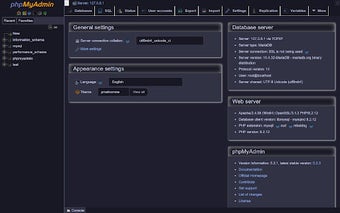
phpMyAdmin Dark Mode: Chrome add-on for comfortable database UIs
phpMyAdmin Dark Mode, created by muhammadamir1151, applies a dark visual layer to phpMyAdmin interfaces to reduce eye strain during database work. The extension injects a CSS override that restyles pages and editors without modifying server files, applying automatically on detected phpMyAdmin pages. Key touches include coverage of the SQL editor, table grids, and designer interfaces. It targets web developers and DBAs who want a low-maintenance, privacy-focused dark theme inside Chrome.
What the extension actually does for phpMyAdmin pages
The extension functions as a client-side CSS override applied by Chrome to restyle phpMyAdmin's interface elements rather than altering server-side templates. Because styles are layered on top of native themes, the override continues to work after phpMyAdmin updates and keeps visual contrast in editors, grids, and dialogs. The developer designed it to be a visual-only adjustment so database operations and backend configuration remain unchanged.
How it affects the interface and editing areas
Smart detection ensures the tool runs only on phpMyAdmin pages and targets the interface areas developers use most. Coverage includes
- navigation trees and table grids
- the CodeMirror-based SQL editor and SQL console
- modals, alerts and the database designer
How the extension handles privacy and maintenance
The extension operates entirely locally: it makes no network requests, collects no analytics, and stores no personal data. The styling is open-source and maintained by the developer, so the CSS can be inspected and adjusted externally. Because there is no remote code execution and no external dependencies, the change is confined to the browser environment and does not affect how phpMyAdmin communicates with database servers.
Who benefits and where the limitations lie
Its audience is developers and DBAs who work frequently in phpMyAdmin and prefer darker interfaces. Compatibility is stated for phpMyAdmin 5.x and 6.x and the add-on requires no configuration to start. The trade-off is narrow scope: distributed as a Chrome extension, it does not provide cross-browser theming or site-wide appearance control, so teams seeking broader theming should consider server-side or global tooling alternatives.
A focused convenience for routine phpMyAdmin workflows
This extension is a pragmatic, single-purpose visual utility that reduces visual fatigue for users who spend extended time in phpMyAdmin. Its minimal-maintenance approach suits developers who want an immediate change without server edits; however, organizations that need consistent theming across multiple admin tools or browsers should adopt a different strategy. For frequent phpMyAdmin users, the extension delivers quick, low-friction improvement to long editing sessions.